

ADVERTISEMENT

Make Floor Plan

Design Professional Floor Plans Instantly with AI-Powered Precision

Make Floor Plan
Verified βœ“ Active
Visit Make Floor Plan →
4.2/5
β˜…β˜…β˜…β˜…β˜… 4.2
Freemium
Free Plan: Yes
Starting at
Free
Free Trial: No
  • βœ“ Extremely beginner-friendly interface with minimal learning curve
  • βœ“ Fast AI generation significantly reduces planning time vs. traditional CAD tools
  • βœ“ Versatile output formats suitable for both personal and professional use

Cons

  • βœ• Advanced architectural features are limited compared to dedicated CAD software like AutoCAD
  • βœ• Free plan restrictions (watermarks and export limits) may frustrate casual users
Overall 4.2
Ease of Use 4.6
Features 3.9
Value 4.3
Performance 4.1

Screenshots

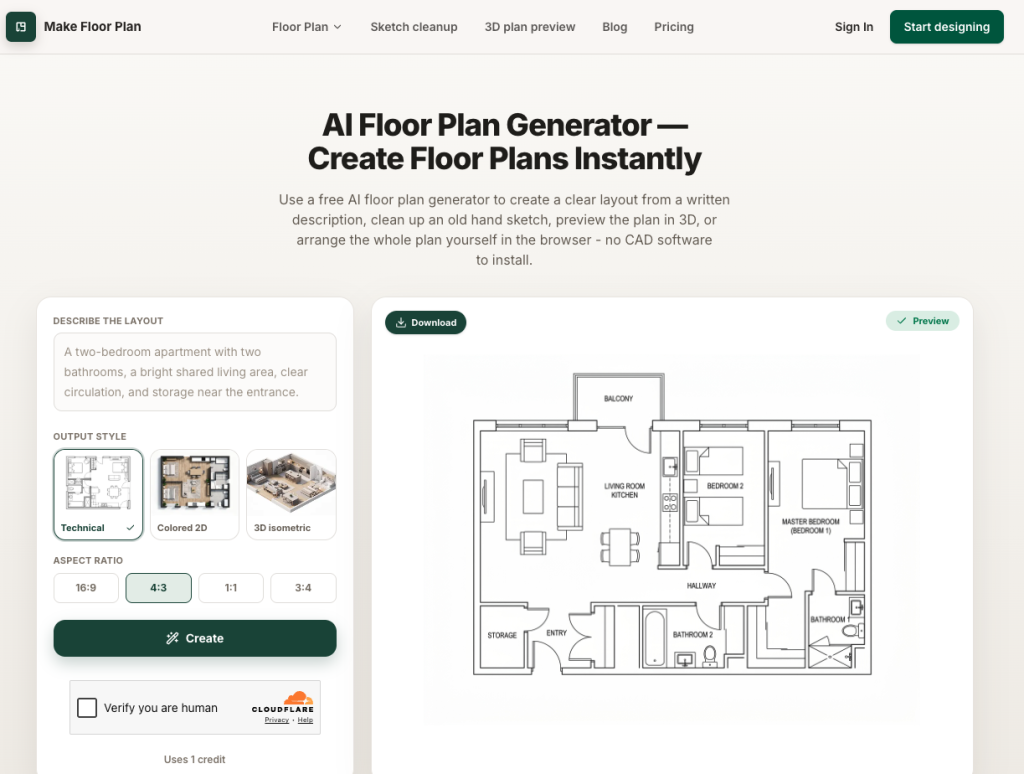
make-floor-plan-screenshot

Demo Video

Features

πŸ€– AI Sketch-to-Floor Plan Conversion

Upload a hand-drawn sketch or rough image and let the AI automatically convert it into a clean, scaled digital floor plan in seconds

πŸ“ Smart Room Drawing Tools

Intuitive room-builder with automatic wall alignment, dimension labeling, and snap-to-grid precision for accurate spatial planning

πŸ›‹οΈ Built-in Furniture & Fixture Library

Drag and drop thousands of pre-built furniture, appliance, and fixture symbols directly onto your floor plan for realistic interior staging

πŸ” Instant 2D & 3D View Toggle

Switch seamlessly between top-down 2D blueprint view and immersive 3D walkthrough mode to visualize the space realistically

πŸ“€ Multi-Format Export & Sharing

Export finished floor plans as high-resolution PDF, PNG, or SVG files, or share via a direct link for client collaboration

πŸ“ Customizable Measurements & Scale

Set real-world dimensions with metric or imperial units, ensuring plans are print-ready and professionally accurate

Overview & Review

Make Floor Plan Review: AI-Powered Floor Planning Made Simple

What Is Make Floor Plan?

Make Floor Plan is a browser-based, AI-assisted floor plan design platform that empowers users to create accurate, professional-quality floor plans without any prior architectural or design training. Whether you’re a homeowner planning a renovation, a real estate agent preparing property listings, or an interior designer sketching a client’s space, Make Floor Plan bridges the gap between complex CAD software and approachable, intuitive design.

The tool leverages artificial intelligence to interpret hand-drawn sketches or rough input and instantly generate clean, scaled floor plans β€” saving hours of manual drafting work.

Who Is It For?

Make Floor Plan targets a broad audience:

  • Homeowners & DIY renovatorsΒ who need a simple way to visualize room layouts before committing to changes
  • Real estate professionalsΒ who want to add polished floor plan visuals to property listings quickly
  • Interior designersΒ looking for a fast ideation tool for client presentations
  • Small architecture firmsΒ that need lightweight, cloud-based drafting without heavy software investments

Key Capabilities That Stand Out

Make Floor Plan’s AI engine is its defining feature. Users can upload a rough sketch and have it converted into a clean digital floor plan within seconds. The drag-and-drop editor then allows full customization β€” adjusting room dimensions, adding walls, placing furniture from a rich built-in library, and switching between 2D and 3D views for realistic spatial understanding.

The multi-format export system (PDF, PNG, SVG) ensures compatibility with client presentations, listing platforms, and print materials.

How It Stands Out

Unlike heavyweight tools such as AutoCAD or SketchUp, Make Floor Plan prioritizesΒ speed and accessibility. Its AI-first approach means the initial barrier β€” translating a rough idea into a usable plan β€” is almost eliminated entirely. For non-technical users, this is a game-changing advantage that positions Make Floor Plan as one of the most practical AI design tools in its category.

ADVERTISEMENT
gamma-aitrendr
SPONSORED SPOTLIGHT

Gamma AI

Act as an expert AI Directory Curator for AITrendr.com. I need complete, accurate, and structured database content to p

Try Gamma AI →
Periyannan
Verified Review EEAT Compliant βœ“

Written & Evaluated by Periyannan

AI directory specialist and technical evaluator at AITrendr. Focused on independent hands-on testing, benchmark validation, and pricing transparency.

Fact-Checked By: Periyannan β€’ Last Verified: Aug 13, 2026 β€’ Methodology: Independent Hands-On Testing

Alternatives

AnyImageDetector

Instantly detect AI-generated images with pinpoint accuracy
Medium

ChatGPT

Conversational AI system powered by GPT-4o and OpenAI…
Low

Claude

Next-generation AI assistant built by Anthropic with 200k…
Low

Claude 3.7 Sonnet

Anthropic's Smartest Model Yet β€” Reasoning Meets Real-World…
Low